Showing posts with label products that are awesome. Show all posts

Wednesday, June 6, 2018

Rebuilding a 1977 Luxman L-30 Stereo Amplifier

My uncle asked me if I could repair his Luxman L-30 stereo amplifier, circa 1976-78. I said I could, so I did!

The L-30 is a 2x35W integrated amp made by Lux corporation in Japan. The company is still around, making hifi products.

When Uncle Pete brought over his amp, it was dirty from sitting around, unused, for many years. One of the knobs had come apart. Turning the knobs while the unit was powered on produced some awful scratching noises, and the knobs were stiff and difficult to manipulate.


I took the amp apart for the first time and cleaned the potentiometers with DeoxIT, a miracle contact cleaner. After turning each knob back and forth about a hundred times, the crackling was eliminated. I also blew out a cubic foot of dust and made some observations about the electronic guts.


Many of the original electrolytic capacitors had leaked their electrolyte gunk (see the big black one in the image below).


I found a great resource on repairing this exact amplifier. The author advised to check the small signal transistors for a "silver oxide creeping disease". The problem was that in the 70s, Hitachi "tinned" the leads of many transistors with silver (instead of tin). Silver oxidises over time, and the rust creeps up the legs of the transistors and eventually rots the guts.

It's hard to tell that the leads of the smaller transistor (installed back-to-back with a larger one) has blackened legs, not silvery/metallic like the other components.

I found some great supporting resources:
So, what's the final scope? I decided to: 
  • Replace 42 electrolytic capacitors, same specs as originals. I am not savvy enough with analog circuits to contemplate upgrades;
  • Replace 17 small transistors (TO-92 package); 
  • Replace the factory speaker terminals with newer, nicer binding posts with banana plug connectors;
  • Do a nice cosmetic cleanup of the knobs and faceplate. 

What I did, and what I learned. 

I spec'd and ordered all my parts from Digikey. My parts list is here on Google Sheets. I ordered Nichicon brand capacitors (UKA, USW and UKT series) and ON Semiconductor transistors. For the capacitors, if I couldn't find an exact replacement, I spec'd the same capacitance at the next-highest voltage rating. 

I splurged and bought wire labels for disassembly. This was probably the best idea I had for the entire project. The kit of professional wire labels kept me organized and made re-assembly a cinch. (the link to the kit is in my parts spreadsheet, linked above). 

Mistake #1: Instead of desoldering the wired pins from the circuit board, I desoldered the wires from the pins, instead of the pins from the board. This made reassembly WAY harder than it needed to be! In fact, to reassemble, I desoldered the pins from the board, soldered the pins to the wires, then soldered the pins back into the board. I doubled my work for no reason. 

Top: Desoldered pins from wires. Mistake! Bottom: Pins soldered to wires, with nice labels. 

First up for replacement were the capacitors. They were simple to replace because the polarity is printed on the circuit boards. 

Another great purchase for this project was a solder-sucker. Previously I'd only used desoldering braid (copper braid that absorbs solder when heated). A solder-sucker makes it SO EASY to remove components - suck off most of the solder with a puff of air, then remove the tiny remaining bit with braid. The sucker I got is on my parts list too. 
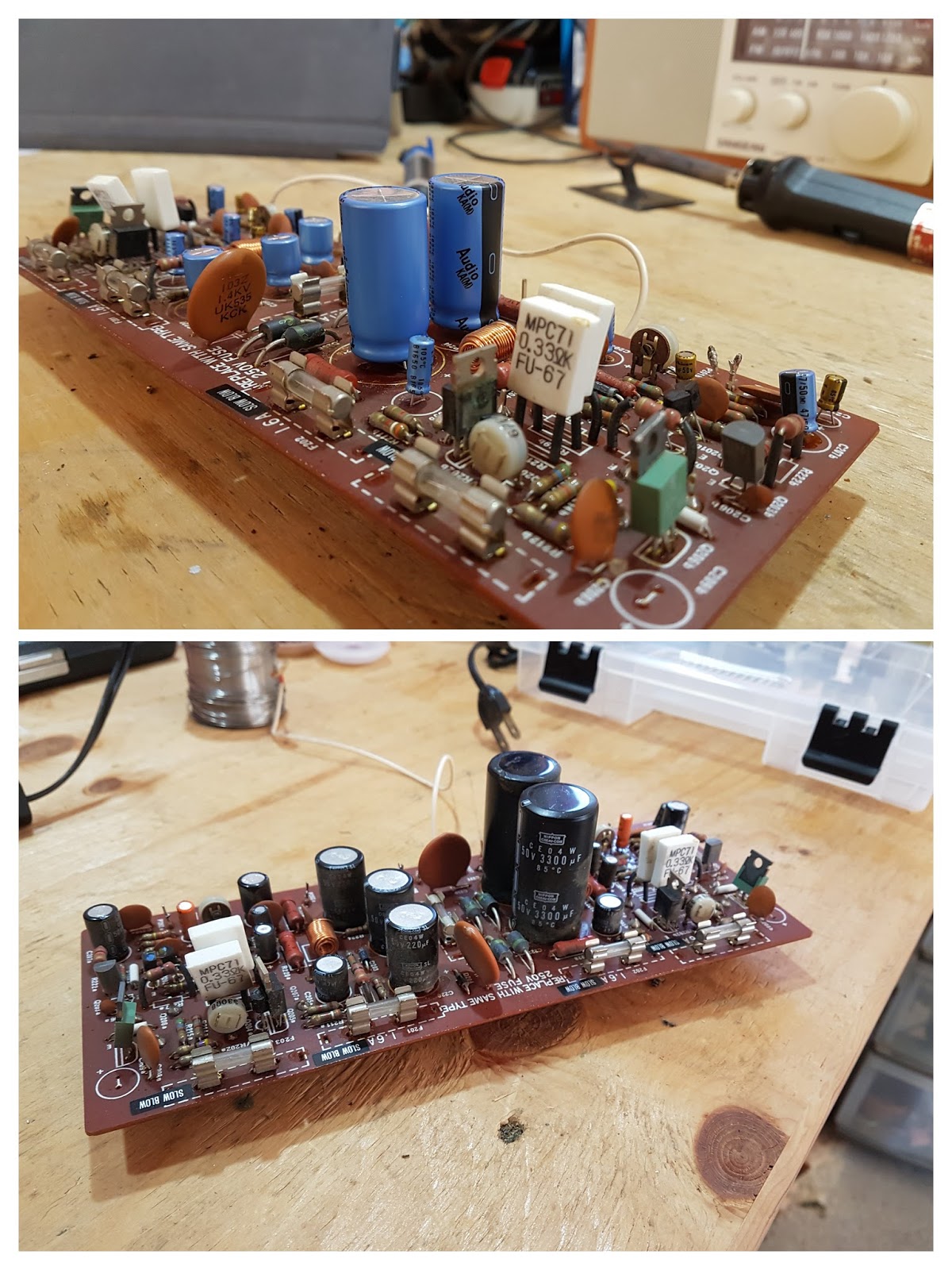
Top: New capacitors in blue (bigger ones) and gold (smaller ones). Bottom: Original PB-1009 circuit board. 
Next up were the transistors. They are trickier than capacitors:
  1. They have three leads (leads);
  2. The pin-out of the new transistors (Emitter-Base-Collector) is different from the old (Emitter-Collector-Base), and; 
  3. They must be installed correctly or else they won't function as intended! Funny things will happen. 
Top: PB-1008 with new capacitors (blue, gold) and transistors (black). Bottom: Original circuit board. 
The last upgrade was replacing the old wind-only speaker binding posts with modern banana jacks, where you can wind or insert your bare speaker wire, or plug in a cable with a banana plug. 
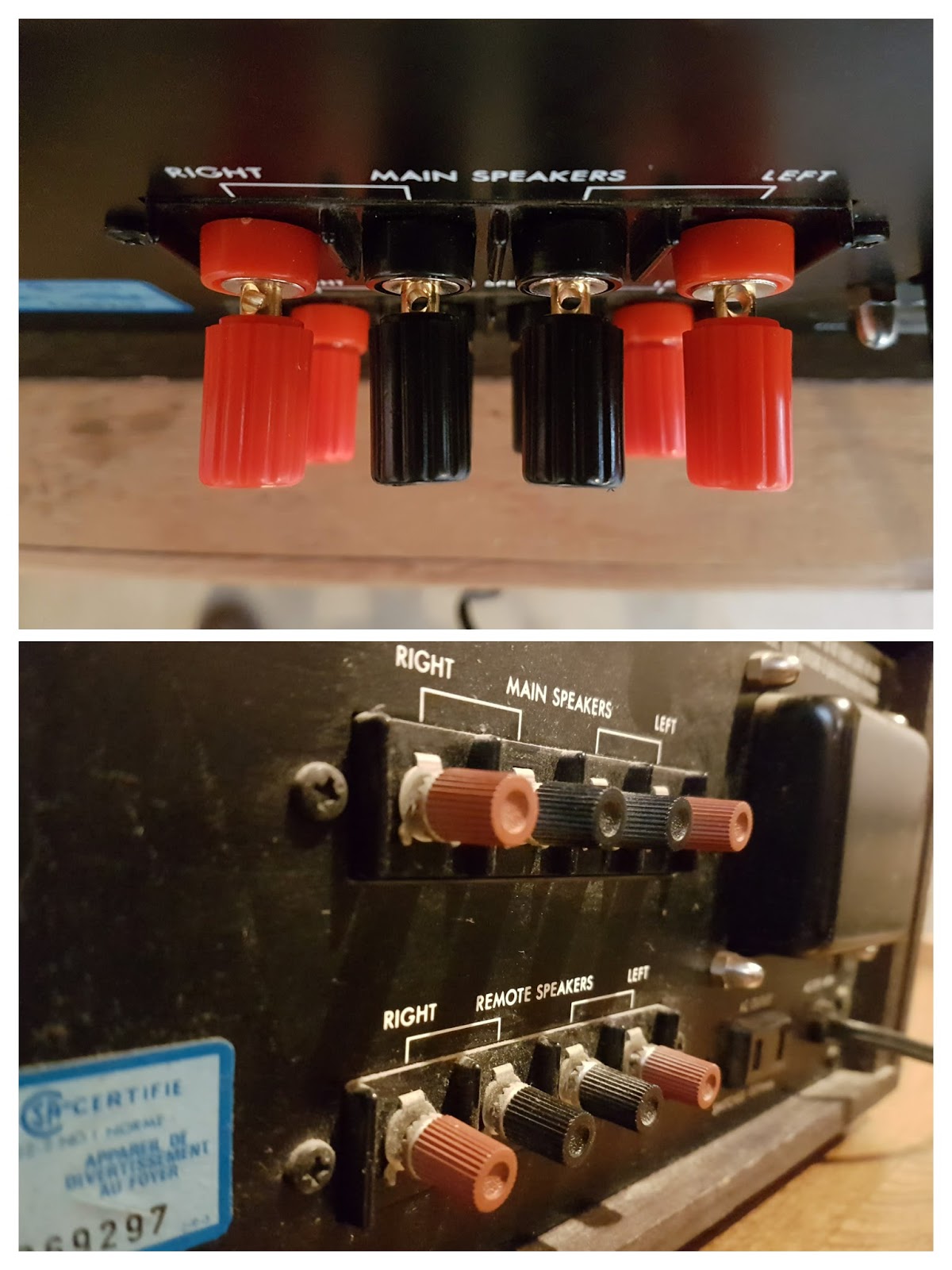
Top: New binding posts. Bottom: Original speaker terminals. 
Next up: testing and reassembly.

I carefully reconnected the pins and wires to the two main circuit boards and arranged them back in the case. I followed the instructions in the service manual to do the 2-step calibration. Step One was an "Idle [current] adjust"; you remove a pair of fuses and measure the current between two terminals. If, after a minute of power-on time you're reading 45mA, you're good to go. I was fine. A good start! 

Mistake #2: The second step is to check the "Zero DC [voltage] offset". You want the reading across each channel's speaker terminals within +/- 50mV (millivolts). I measured the right channel at about 25mV. I measured the left channel at 33V - over 600 times what I expected! 

Disappointed, I pulled everything apart and started hunting for mistakes. I knew it was going to be a transistor installed incorrectly because one channel was good, one bad, and capacitors don't amplify voltages. After a few minutes of searching, and double- and triple-checking my work, I found one transistor (Q202a) installed incorrectly. 

Lesson learned: the calibration procedure was critical. If I had just plugged it into my speakers to test, I'd be shopping for a new pair of speakers. 

Work bench during one disassembly. 


Excited, I put everything back together for final testing. Both calibration checks checked out. All good. It's time to fire this baby up! 

I assembled the amp and took it inside. I powered it on. I queued up a record, dropped the needle, and....

Nothing.

Not a sound came out of the speakers. I turned up the sound just a bit. I heard something - so I maxed it. Terrible, choppy, intermittent sound. I could hear all the loud bits but the quiet parts of the song just dropped off. Stuttery. 

My heart fell - I really thought it was going to work. I had no idea what the problem might be. Disappointed, I went back to the garage for disassembly #3. 

Mistake #3: Since the problem was present on both channels, I reasoned that I had a serious issue with parts/components. I printed out 7 transistor data sheets (4 old types, 3 new) and started comparing specs.

After a few minutes of comparing data sheets I realized that I did something so dumb that I had to quadruple-check to be sure. Everywhere I wanted to install a BC550 transistor, I'd installed a BC560, and vice-versa. 

How did I manage something like this? I looked at my parts list, and from Day 1 I'd spec'd the wrong transistors. 

I figured it out later that day. Looking at Hilberink's website again, he says: 
The 2SA836 and 2SC1345 made by Hitachi will sooner or later add a lot of noise and even storm and thunder to your RIAA amp. [...]
Replace with modern BC550C/BC560C and all noise problems are history. 
I read these two sentences, and without even thinking to double check, noted to replace 2SA836 units with BC550, and to replace 2SC1345 units with BC560. In fact, it should have been the other way around (2SA836->BC560, both PNP type, and 2SC1345->BC550, both NPN type). This was totally my error - rushing, misunderstanding, and not double checking. I only had to replace 11 transistors and I'd be all set.


One more set of calibrations as a sanity-check, then I assembled the L-30 for the last time. I'd cleaned and polished the faceplate and all the knobs. The volume knob, which had fallen apart, was securely glued back together.

I plugged the unit it and dropped in an Ella Fitzgerald & Louis Armstrong album that I found in my parents' collection. I don't have the musical vocabulary to describe it as anything other than AMAZING. Superb warm sound.

That warm sound... get it?
That was Sunday night, and over the next few nights I listened to all kinds of stuff. It's hard to explain how the Luxman L-30 drives my KEF LS50 speakers in a totally different way than my NAD 3020 (rebuilt 2 years ago, and going strong). I was in love.

My Uncle Pete came over tonight to pick it up, and I think he was blown away. He brought over a record (I don't recall which one!) and we listened to most of the A side. Then we listened to tracks from The Sword, The Rolling Stones, Yngwie Malmsteen, Tony Bird, Eternal Champion, Iron Maiden, and Buffalo Springfield.

He was excited to be leaving with it, and I was sad to see it go! This was an exceptionally fun project, and challenging because I make some mistakes along the way. That's OK because I learned more than I would have otherwise.

What's next?

Full album/gallery. 

Thursday, August 4, 2016

Re-cap on NAD 3020 Stereo Amplifier

A few weeks back I started hunting for a turntable and amplifier. My dad had his old kit boxed up in my parents' garage and he was happy to give the NAD 3020 amp and Onkyo CP-1010A turntable a new home!

After connecting all the gear, everything sounded good (so, so good), but occasionally the right stereo channel would drop out. A sharp tap on the amplifier would bring it back. Apparently this is symptomatic of failed or failing capacitors, because electrolytic capacitors are generally not designed to last 30 years or more.

I found the service manual for the NAD 3020 online and was amazed to find a full design circuit diagram, parts list, and labelled circuit board wiring diagram. Replacing the caps was going to be easy.

I put together a quick parts list of all the capacitors I had to replace - 42 in total. Only the electrolytic capacitors required replacement because the conductive electrolyte inside them can (and did) leak over time. The ceramic and mylar capacitors inside all passed a visual inspection.

I placed a Digikey order (~$60 for the bare minimum parts but I ordered spares and ended up around ~$90) and warmed up my soldering iron. Sure enough, a good number of the caps were trashed:


One daugherboard with caps removed. You can see the gunk where the electrolyte leaked in at least two places.

The order arrived and I started installing new caps Here's that daugherboard back in place. Anything blue or gold in this pic is brand new:

These 2200 μF caps were the biggest, and replaced 4 completely trashed caps on the input power filtering (I think). All the new parts were different brands and dimensions than the old ones, but that's okay. For cap replacements, as long as the capacitance is the same and the voltage rating matches or lightly exceeds the original, you should be good. Or so I read.

Powered back up!

The first thing I noticed was that everything sounded a bit sharper, but the amp still has a beautiful warm tone. When I listen to music on this setup, I am amazed to hear new details in songs I've heard hundreds of times - instrumental trills, soft vocals, basslines, and more.

Saturday, February 6, 2016

Homemade Soylent (Schmilk)

In 2013 I read about Soylent, a "nutritionally complete" meal replacement beverage invented by a software engineer, who started a 30-day experiment to see if he could survive on the stuff. His experiment morphed into a crowdfunding campaign with a feed-the-world-cheaply theme and he raised millions of dollars to start mass-producing it for sale.

Do people need "real food" to survive and thrive, or can we break food into its macro- and micronutrient components and reassemble those pieces to create something equivalent? Possibly better?

A lot of people were intrigued by the same question and the "powdered food scene" seemed to grow a lot in 2013 & 2014.

The shipping date of Soylent to Canada was never confirmed. When I started getting serious about losing weight in 2015 I started doing some research on homemade, powdered food meal replacements. The appeal was:

  • Easily portionable and measureable (to meet caloric needs)
  • Inexpensive 
  • Easily hackable (for instance, easy to bump up the protein content or lower the carbohydrate content by adjusting the formula) 
  • The buzz-phrase "nutritionally complete" kept popping up. 

As it turns out, Soylent (the company) hosts a recipe section on their website where users can submit and review recipes.

A 450-calorie serving of homemade Soylent

I found one called Schmilk Chocolate that I thought I'd try. It uses whole milk as a source of fat and protein. I made a batch and had it for breakfast every day for a week. It was pretty good! Bland, but not offensively so.

Since early summer 2015, I have been eating/drinking this homemade Soylent every workday for both breakfast and lunch. For supper and meals on weekends I have "real food". I have observed no ill-effects whatsoever (including excess flatulence, which some Soylent users had trouble with).

The positives are:

  • Easy to make. I mix the powdered ingredients with whole milk a meal ahead; the consistency is better if it sits in the fridge for a while.  
  • Easy to measure (12.6 grams of powder + 100 ml of whole milk = 108 calories. Scale however is appropriate. I started drinking 670 calorie portions, then 550, currently 450). 
  • Easy to consume - you just drink it! 
  • Tastes okay. Hard to describe; it's so bland that there are not any defining offensive flavours. The balance of fat, salt, and everything else seems to tell the body "this is good". I usually add an espresso shot for flavour. 
  • Makes me feel satiated and satisfied until the next meal. 
  • Keeps me regular.
Now that I'm basically at my goal weight, I don't think I am going to stop with Soylent any time soon. It's a part of my routine, and something I miss if my routine is interrupted. 

Recipe - Schmilk Chocolate - "5 day" Batch

1 kg Oat Flour (Only Oats brand comes in 1 kg bags) 
60 g Cocoa powder
53 g Acacia Fibre
30 g Psyllium Husk powder
16 g Iodized Salt 
5.5 g Potassium Citrate 
5.5 g Choline Bitartrate 
2 g Stevia Powder 
1.5 g Xanthan Gum 
5 g (or 5 daily servings) Multivitamin (powder)
9500 ml Whole Milk

Recipe notes:
  • Most ingredients can be found in health food stores, all can be found online. 
  • Mix all dry ingredients ahead of time.
  • Food scale required. 
  • 12.6 g powdered mixture + 100 ml whole milk = 108 calories.
  • Recommend mixing at least 1 hour before consuming for better consistency. 

Saturday, April 20, 2013

Hawaii's Best Treat

Oh, hello there blog! Long time, no see.

I have largely ignored blog posting since we moved into our new house in January. It's really awesome, especially compared to our old place. I'll post about it some other time though.

Robyn and I just got back from a relaxing 10 days in Hawaii. We spent 8 nights on the Big Island - the one with the volcano:

Lava flow covering the road in Volcanoes National Park, Hawaii. 

There is an awesome, awesome treat that can be found in Hawaii's gas stations and grocery stores: the SPAM musubi.

Here's one from a grocery store. 

It's a fried piece of spam, surrounded in non-vinegared sushi rice, wrapped in nori (seaweed paper stuff). You may be raising an eyebrow right now, but it's extremely tasty! Think about it: salty ham flavour, rice for bulk, and nori for that "umami" savoury flavour.

Here's one I got at a farmer's market in Hilo, Hawaii with a piece of pineapple across the top:

If you are ever in Hawaii, I urge you to seek out this local treat and try it! If for no other reason to tell your friends you tried it. But I am pretty sure you'll like it!

One of these days I'm going to make some... so beware if you get an invitation over!

Thursday, November 29, 2012

Q: Will a king bed fit in our new house? A: Google Sketchup (awesome product!)

Robyn and I were trying to figure out whether a king bed will fit in our new house. To answer that question I immediately downloaded Google SketchUp, which is an awesome (and free!) CAD/drawing application.

Using the blueprints of our new house (possession: January!) that we got when we signed the contract, I had a mockup of our top floor, down to the inch, in about 90 minutes. I could have stopped at the bedroom, but we also wanted to see if my giant desk would fit in a spare bedroom.

So, will a king bed fit in our new master bedroom, and will there be room for bedside tables and dressers? The answer is definitely yes:


In 2009, SketchUp also helped me figure out if I could fit a queen bed in my apartment bedroom, along with my huge desk (split in two) and a bookshelf. The answer was yes - barely:


If you've used any CAD programs before, you'll adapt to SketchUp quickly. There are also lots of SketchUp video tutorials and lessons for beginners. SketchUp is a VERY handy program that can always answer the question "will it fit?" - so long as you know your room/house/whatever's dimensions!

Monday, November 5, 2012

Cast Iron Cornbread

Yummmmmmmmmm:


Crunchy, buttery outside, sweet tasty inside!

My favourite new toy is the cast iron pan that Robyn and I got for our wedding. I made this recipe from foodnetwork.com after work today, and YUM, I will be making it again.

Cast iron pans = AWESOME.

Friday, July 27, 2012

Not Going Back to Non-Stick!


I recently posted about my roommate moving out, and how living alone kind of sucks.

One think that's FUN about roommates moving out is that both parties have to stock up on formerly-shared housewares. Actually, I guess this is only fun if you're financially able to stock up on housewares and you secretly love buying housewares. Hmm.

Anyway, I love housewares. In our apartment, I owned most of the pots, but my roommate owned most of the pans. Most of his pans had a Teflon non-stick coating, with the exception of one gigantic, brilliant, stainless steek wok.

After using that stainless steel wok, I am never going back to Teflon again.

My main beef with Teflon (and any other off-brand non-stick coatings) is not the remote health risks to humans and birds, rather, it's the fact that the coating is not permanent!! From pots to pans to George Foreman grills, everything with a Teflon coating is basically a ticking garbage time bomb waiting to find its way to the dump. My secondary beef with Teflon is that you have to worry about what utensils you use to stir and scrape, or risk accelerating the garbage time bomb.

It doesn't make sense to continue buying $30 Teflon-coated frying pans every 2-5 years. So when my roommate took his magnificent stainless wok away (along with his average Teflon pans) I bought two stainless frying pans and a wok from Home Outfitters for $170.

I'm not trying to say, "Ooooh, look at me, look at all the money I'm spending on pans." I'm just re-learning the same lesson I have to re-learn every few years: buy good quality and it will last a lifetime (see other post about my hunt for the perfect messenger bag). Good quality doesn't have to be TOO expensive. I spotted some pots and pans that cost upwards of $250 apiece - probably because it costs a lot of money to print Jamie Oliver's face on the packaging.

Monday, May 7, 2012

Awesome Beers

I tried these excellent beers when I was down in the states with Robyn last week. Maybe... MAYBE I only bought them because they had awesome names/bottles.


More posts to come soon! The olde bloge has been dormant for a few weeks but I have some content ideas knocking around in my head.

Tuesday, February 21, 2012

Accessible Encryption, Privacy & Security

Sometimes I talk to people about things like privacy, security, or data redundancy and they look at me like I'm a crazy person - why would anyone care about that? Do you have to be some sort of sick weirdo to care that much about those issues?

The reality is that my digital life is pretty boring, but it's important to me. I've had relatives have their emails "hacked" and I can only imagine how much it sucks to lose all of your correspondence and contacts. I've seen stories of people who bring their computers to a shop to have them repaired, and the creeps at Best Buy copy all sorts of personal files to snoop through later. I'm also extremely uncomfortable with the idea of people (internet service providers, governments) monitoring my web browsing habits, just like I'd be uncomfortable reading my physical mail and packages, or looking at my library history, or reading through my medical files.

Here's a few pieces of software that I use to keep myself safe and secure.

KeePass - free - www.keepass.info

One of the worst things you can do online is use the same password EVERYWHERE. If someone breaks into your email account, they can search your history to find all the services you subscribe to (Facebook, your bank, Skype, etc) then try your password on those sites. Odds are in their favour that it will work.

KeePass is a vault where you can store all of your passwords. You set a "master" password on the vault, then save all of your other passwords inside. KeePass also has a password suggester/generator which helps change all of your dumb passwords into awesome passwords. The file is highly encrypted (you generate entropy for the encryption by waving your mouse around the screen) and can't be accessed if you use a complex password. KeePass looks like this:

Generally I have a few unique passwords I remember, like my Gmail account. But everything else goes in the vault, and I randomly generate a 20+ character password for each account. If you asked me what my online banking password was, my honest answer would be "I don't know". I've been using KeePass for over four years and find it indispensable.


TrueCrypt - free - http://www.truecrypt.org/

TrueCrypt is free and open source hard drive encryption software. You can choose to encrypt your whole hard drive, create an encrypted "container" (like a folder) that you can encrypt and decrypt on the fly, or create a secret, undetectable hidden partition. Like KeePass, it uses extremely robust encryption to secure whatever you need away from prying eyes.

What would you store there? Ask yourself this question: If someone stole your computer, do you have any files that you'd never want to be shared with the world? Those are the files you'd encrypt with TrueCrypt. Maybe it's your tax return, maybe it's some bad Grade 8 creative writing that you can't bring yourself to delete, maybe it's your digital diary, who knows.

Or maybe someday you're going to have to cross a border into another country. Border security agents are getting more and more power to do things like copy your entire hard drive onto their systems for analysis. Imagine landing in London only to be immediately deported for having some pirated movies on your laptop. Forget asking whether they might find anything incriminating - do you think your personal data is safe with them?

Just how good is this encryption? Right now, there's a mortgage fraud case in the States where a judge is ordering a defendant to decrypt the contents of her laptop because the Feds can't break it.


Prey - free (for basic version) - http://preyproject.com/

Prey is free (for the basic version) and open source software that helps you recover your computer, phone, or tablet if its stolen. You install the software once, then write down your website username and password somewhere safe (how about your KeePass vault, backed up on your Dropbox account?).

If someone steals your computer and connects to the internet, Prey acts like a "good guy" Trojan horse - you can turn on the webcam, take a picture of the bad guy, and get information about where it's connecting to the internet from (without the thief knowing). You can take that info to your local police and they'll usually step in and get it back. Prey has a whole blog of success stories of people who recovered lost or stolen devices with Prey:
http://preyproject.com/blog/cat/recoveries


A VPN (I use WiTopia, which is $50-70 per year)

I just blog posted about this the other day - go read this post: http://blog.brahm.ca/2012/02/virtual-private-networks-and-why-you.html


Tor Browser - free - http://www.torproject.org

In my blog post about VPNs I give an over-simplified explanation of how VPNs work. Tor is a network of VPNs that obfuscates your location by encrypting your web traffic and routing it through multiple "Tor nodes" all over the globe. A super-detailed explanation can be found here.

I first heard about the Tor project a few years ago, when it was significantly less user friendly - it required a lot of end-user configuration. I just checked it out today, and wow, I'm impressed. It can be downloaded as a pre-configured instance of Firefox's portable edition that "just works". You start it up, wait a second as it builds an encrypted connection, and this is what you see:


If you're trying to access the internet from a country with a crazy dictator or want to take the simplest step possible to protect your privacy when you're travelling, install Tor Browser. Here's a list of who uses it, and why.

--

Make yourself and your data safe, and protect yourself from digital snoops!

Thursday, February 16, 2012

Awesome Products: TimBuk2 Command Messenger Bag

After buying a few cheap messenger bags and having them fall apart, I began the search for the perfect messenger bag - I needed the best. The best resource for finding random product testimonials turned out to be reddit. There were several discussions for "best messenger bag", and one of the most commonly reoccuring brands was TimBuk2.

I ordered my TimBuk2 bag in June 2011, and 8 months later I'm still impressed.

Purchasing
TimBuk2 has a wide selection of bags and backpacks - something for everyone. You have the option of personalizing nearly every product in their inventory, or go with a plain design (my preference, since I don't want anything too eye-popping). Most bags come in multiple sizes; good for customers with laptops large and small.

On the online store, most products have an embedded YouTube video of someone from the company handling the bag/backpack for 60 seconds and opening the pockets, so you can gauge its size. This is a surprisingly useful thing! There are also tons of user reviews on the site - both positive and critical. Being able to see what other customers like and dislike about each bag helped me narrow down my choice (and the fact the company doesn't remove negative reviews adds credibility).

Everything is handmade in San Francisco and shipping was very fast!

My Bag - the Command Messenger
I selected the Command Messenger model for its laptop pocket and for its ability to fold flat for airport security (so you don't have to take the laptop out of the bag). After taking the bag on a few flights I found it was often faster to take the laptop out anyway, rather than explain to the screeners it was a TSA-compatible bag.

The laptop pocket is bright red on the inside and the fabric has foam padding bubbles inside of it!


Inside, there is a HUGE main pocket and a handful of smaller pockets, including a pen and business card holder that could be removed (velcro). Some of the inner areas zip closed, others are open for easy grabbing. There are four outer pockets - three hiding under the velcro cover flap and one accessible through the side (perfect for house keys).


There is a secret pocket on the bottom of this bag that's perfect for laptop power bricks - the tangles of cords stay out of your way while travelling.

The bag is near-flat when empty but seems to magically expand to hold whatever I need. It's a true man-purse: you can carry things like umbrellas, light jackets, and scarves just because you can. Since the laptop pocket is separate from the main pocket, carrying a laptop doesn't really reduce your carrying capacity. I'd be able to carry a laptop and two gigantic engineering textbooks with ease.

Impressions
This bag is solid. Before purchasing, I read a few reviews where a small handful of customers had bad stitching, but TimBuk2 flexed their customer service muscles and fixed or replaced them for free.

With the main velcro cover flap, it's easy to grab stuff while you've got the bag shouldered. The strap is padded and adjustable and it's just comfortable.

The one feature missing on my bag is a comfortable carrying handle. It has a handle, but it's a one-inch piece of flat seatbelt material. If the bag is even moderately filled, carrying it with the handle can be uncomfortable.

With shipping and taxes I ended up spending about $150. It was expensive, but it was a planned, well-researched decision and I've been very happy with the result for the past 8+ months, and expect it to last a few years at least. If you're in the market for a new bag, Timbuk2 has my recommendation!

Wednesday, February 15, 2012

Virtual Private Networks and Why You Might Want One

On Tuesday I signed up for a paid Virtual Private Network (VPN) service. Why? In three words: privacy, security, and flexibility.

The internet is not a series of tubes as you may have been led to believe. It is a network of computers that all have to talk to each other. Sometimes it is not clear who owns what computer, if they are using it for good or for evil, or if it can access your private data.

Here's a simplification of how the internet works. Let's say you want to visit Wikipedia, so you type http://en.wikipedia.org into your browser. Your network traffic (requests you send to the internet, and the data that comes back) first passes through your local network. This is literally the network you're connected to - a router at home, a wifi hotspot at Starbucks, or maybe a computer lab on campus.

Next, the traffic passes through your Internet Service Provider's servers: SaskTel, Shaw, Rogers, etc. Finally, your traffic passes through more servers until it gets to Wikipedia's servers. Wikipedia's servers then sends information back to you the same way you received it. Anyone who is determined enough can snoop at what you're looking at - maybe someone sitting at the other side of Starbucks, or maybe someone who works at Shaw, or maybe some tricky hacker.

A VPN creates a highly encrypted and secure connection (a "tunnel") between your computer and a VPN server. If you type http://en.wikipedia.org into your browser when you're using a VPN, the VPN server "asks" Wikipedia for the info you wanted, then sends it on to you. Wikipedia won't know anything about you (unless you're logged into a user account) and it cannot tell you're using a VPN, and no-one between the VPN server and your computer can see what's going on, either.

Here's a diagram I made (all by myself!) that explains how VPN works. Click to enlarge:

It is virtually impossible for anyone between your computer and the VPN server to figure out what you're doing on the internet - whether it's paying your bills, submitting your tax return, typing a note to your sweetie, learning about dogs and cats, or watching a saucytime grownup film.

Privacy and security are good enough reasons to get a VPN - I'm confident that data I'm transmitting on my computer can't be intercepted by local hackers, my Internet Service Provider, the government, or whoever might be "listening" to internet traffic. But the coolest feature - at least for Canadians - is flexibility.

Lots of websites know roughly where you're browsing from, based on your IP addresses. It's why when you type "www.google.com" you're taken to www.google.ca. It's why Canadians can't watch lots of streaming videos, due to dumb licensing rules.

But with my VPN provider, I can pick a VPN server anywhere in the world, so my traffic looks like it's coming from anywhere in the world. I can pick a server in New York City and immediately start watching videos on ComedyCentral or Hulu (or others). Or I can pick a server in the UK and start watching BBC content.

I selected WiTopia.net as my VPN provider. They are very well-reviewed, and in my limited experience - great. They responded to a bunch of pre-purchase questions quickly and with lots of details. There are some free VPN providers out there, but it's easy enough for a 16-year-old hacker to set up a VPN server and make it look legit - so I'm paying for peace of mind. With WiTopia, you can pay by the day, month, or year, and there are lots of money-back guarantees. So check them out if you want to protect your online info and free yourself from the shackles of location-based internet!

Blog post: done. Now I'm off to watch full episodes of the Colbert Report!

Wednesday, February 1, 2012

Software that is Awesome: f.lux (or Flux)

Stop what you're doing. Download and install this program on your computer right now: f.lux (for Windows, Mac and Linux)

Your computer monitor is designed to behave like the sun - blasting out a full array of bright colours. That's fine during the day, but at night, computer monitors can look WAY too bright and blue, which strains your eyes (or worse, gives you headaches and sleep issues!).

Flux reduces eye strain during evening computing sessions by matching the colours on your computer monitor to the lighting conditions in your room and the position of the sun. You install the software, tell it what type of lights you have in your primary computing location (incandescent/florescent), and tell it your geographic location. DONE. Flux does the rest, "warming up" the colours of your monitor in the evening.


At first, you might find this software incredibly annoying. You may be tempted to think "my computer practically looks orange at night". I urge you to try this software for at least two weeks if you use your computer regularly in the evenings, or a month if you're an occasional nighttime user. I hated Flux at first but now can't compute at night without it. Over time you get used to the software adjusting your on-screen colours automatically, and you even come to depend on it for sanity. I accidentally messed up my settings a few weeks ago, and dropped everything I was doing until I fixed it. I just can't compute on a brain-scorching bright blue display at night!

I absolutely recommend this nuisance-free, hassle-free software to everyone out there.

Thursday, August 18, 2011

Technology-Enhanced Summer Reading

This summer I have pushed myself to read more books. I became fascinated with Amazon's Kindle a few months back and convinced myself that owning a Kindle would make me a better and more regular reader.

Instead of impulse-purchasing a Kindle, I borrowed three books from Robyn and told myself I could buy a Kindle if I could finish all three books (they were A Prayer for Owen Meany, The Road, and The Lovely Bones - all great reads!).

While I was reading those books I discovered GoodReads, a social networking site for readers. I signed up for it immediately because the idea of tracking my reading satisfies my nerdy quest to log certain activities in the way that last.fm logs the music I listen to.

On Goodreads, you can track the date you start and finish each book, and write reviews and assign 5-star ratings to each title. Each author and book has its own GoodReads page (similar to last.fm's artist, song, and album pages) which are good places to discover previously-unheard of material from familar authors. Although I am not a daily user (I wish I could read so much!), if you've got a membership, add me as a friend.

After reading Robyn's books I placed the order for the Kindle. In a word, this device is impressive. The text on the screen looks just like printed words on paper - there is no glow of an LCD screen or pixelation if you look closely. The device is thin and lightweight and it took less than one chapter of one book to feel one hundred percent comfortable using it.
It's about as thin as a pack of gum.

My pal Derek has a great post on tweaking your Kindle to get it working just the way you want it. I have to say though, you don't really need to tinker with it; it works great right out of the box.

Close-up of the display. 

I saw an interview with Amazon CEO Jeff Bezos on Charlie Rose a while back and Charie asked about competition from other "tablet" makers like Apple and Google (iPad and Android tablets). Bezos immediately responded that they are not competing with iPads - for two reasons. For one, the Kindle is a purpose-built device for people who love reading. It happens to do a few other things, but it's a reading machine. The other reason is that Kindle is not just Amazon's physical reading device, it's a digital store that distributes books through a program/app that can be installed on just about any computer, iPad/iPod/iPhone, tablet, Android, BlackBerry, you name it.

Anyway, I am tagging this post "products that are awesome" because both GoodReads and the Amazon Kindle are really fantastic and have both encouraged me to read more! I think everyone who I've talked to who owns a Kindle is happy with it.

Monday, August 15, 2011

Products that are Awesome: NoLED for Android

I've had an Android phone for the past 9 months or so and I've really grown to love it. There are times, though, that I miss certain features that my old BlackBerry did so well. Take BBM, for instance. It's still the best instant messenger out there, despite competition from iMessage and Google Talk, not to mention cross-platform offerings like WhatsApp (which is awesome!) and Kik.

Another feature that some Android phones lack is a notification LED. The little LED on the BlackBerry was a great, quick visual indicator of unread messages or emails. You could customize its behaviour with an app - blinking blue for Robyn, solid green for Matt, etc. I really missed that feature when I bought my Android phone, the Samsung Galaxy S Vibrant. Instead of looking to an LED for notfications, I have to press a button and wake up the display.

I recently found a very niche app called NoLED that fixes this problem with a clever solution. As it turns out, the display on the Galaxy S Vibrant is of the Super AMOLED type, which is an advanced enough display that no electricity/battery is consumed to display the colour black, since the technology doesn't use a backlight.

When you receive a notification with NoLED and your display is off and/or locked, a tiny pixel of colour will appear in lieu of an LED lighting up. The colour corresponds to an app, and is user-customizable. So maybe red means Gmail, orange means SMS, and blue means missed call/voicemail.

If you don't understand this idea yet, watch the first 15 seconds of this video.

To avoid "burning in" an image into the display, the pixels dance around the display, changing position every second or two. I find this feature useful for another reason - it's easy to spot the movement out of the corner of your eye.

The pixel size is customizable, and you can even choose to use app icons for notifications. For a WhatsApp message you see the little green icon dancing around, and for Gmail you see the classic envelope icon. NoLED makes this feature even better by allowing you to use contact/profile pictures for SMS and Voice call notifications! So if I get an SMS from Robyn, her contact picture jumps around the display.

The menus are packed with features and settings which can be overwhelming. The advantage is that you can get your phone displaying notifications exactly how you want them to behave - everyone has different preferences.

I have been using this app for a few months and have not noticed any excess battery drain due to NoLED running. The app can use the phone's proximity sensor to know when it's in your pocket or face-down, and will turn off the display completely to save that tiny extra bit of juice.

One last thing - if I haven't sold you yet, it's a FREE app. It's under active development and it's updated regularly - not too much, not too little. The developer is also receptive to feedback - I emailed in a feature request and received a reply the same day (my idea couldn't work!). If you love the app, you can donate with in-app purchasing. I sent $5 to the developer - it's one of the most clever Android apps in the market and one of my favourites, and I felt it was well worth it.

Download here.

Sunday, August 14, 2011

Awesome Products: A Wok

That's right, a wok! I bought a cheap wok for $25 at Winners a few months ago, and it's one of the best purchases I've made in recent memory.

Frying pans are great - I have two, a round flat one and a square grilling pan - but nothing beats a wok for sheer size and stirability (if that's not a word, it is now). No more frying pans overflowing with meat sauces!
Tonight's supper and five days of lunches. 

Having a wok while living alone is especially great since I can make a TON of leftovers. On most Sundays I cook myself a huge wok-based meal so that I can eat like a king AND pack 3, 4 or 5 days' worth of lunches for the upcoming week.

These are some of my favourite things to make in a wok:

  • Beef or chicken stroganoff (0.5 kg meat but into thin strips, a chopped onion, 250mL sour cream, salt, pepper, half a bag of egg noodles).
  • Meat sauce & pasta (0.5 kg lean ground beef, tomato sauce & tomato paste, vegetables and spices to taste)
  • Curries (0.5 kg beef or chicken cut into thin strips, a bag of frozen vegetables, a jar of curry paste OR 3 tbsp curry powder and a can of coconut milk, cook rice on the side)
  • Stir-frys (vegetables, meat and sauce, serve over rice or mix in chow mein noodles)
Let me know if you have any recipes that are tasty and easily made in a wok! 

Monday, August 8, 2011

Awesome Products: Google Picasa


I purchased my first digital camera in 2002. It was a cheap EZ-Pics (or similar) sketchy brand that lied about its megapixels - it was 3.0 MP "with software extrapolation", which meant that it was a 1.5MP camera that used software to double the number of raw pixels in the photos, and coloured those pixels with the "average" colour of the two adjacent pixels. Suffice to say the pictures were terrible.

I'm just about the farthest thing from a professional photographer, but my photos are still very important to me! My first crappy camera took lots of pictures of our dog Yogi as a tiny puppy:

Most of my photos live on my home server (see first two images here), a computer that does nothing but sit there and hold files. However, I'm very conscious of the disaster scenario of my apartment building falling down (I do live in Montreal, Quebec, and infrastructure seems to be failing lately!). If my server were to die, I'd lose 10 years of digital memories.

Rather than print all of my photos out to albums, I've chosen to use Google's Picasa software as a backup solution.

I pay a flat fee of $5 per year for 20GB of online photo storage with Google Picasa Web Albums, which is enough for 5,000 high-quality photos, or many times more lower-quality photos. Every time I load photos onto my computer, I've set up Picasa (the desktop software) to save a copy on my laptop and immediately upload a copy to Picasa Web Albums.

Actually, lower-quality photos no longer count towards the storage limit on Picasa anymore (thanks to Google Plus!) . All photos under 2048x2048 pixels - a respectable resolution, for sure - are stored for free! It's possible to configure Picasa's desktop software to automatically re-size all of your photos to under these dimensions and upload them for free, so that you always have a safe backup copy of your digital images.


It's important to note that the online backup doesn't happen automatically, you need to be logged into Picasa (the desktop software) with a Google account and explicitly tell it to save images to Picasa Web Albums. You need a Google/Gmail account to do this, but it's not difficult.

It is also important to keep an eye on permissions when uploading to Picasa Web Albums. By default, my albums are private and un-searchable, but you can also set albums to be public, shared with specific users (requires Google login), or only accessible with a link (good for emailing).

A year and a half ago, before the unlimited upload of lower-quality photos, this service was still a bargain at $5/year. I found it was the best backup solution out of Picasa, Flickr, Dropbox, and a few other web archive solutions at the time, and I'm interested to hear if anyone's got a better solution.

If you use other Google products, you will want to check out Picasa. If you buy extra storage space, it counts for your whole Google account, so I really have 20-some GB of storage for pictures in Picasa, emails in Gmail and documents in Google Docs. Picasa Web Albums has been nicely integrated in Google+ and makes sharing with Circles very easy, and it's also easy to share private albums by email with friends and family.

If you've got a free afternoon this summer, back up your photos! My sister lost all of her photos when her laptop died suddenly - it could happen any time. Hell, if you're too cheap to afford $5 per year, at least burn a DVD (under $1) and keep it at someone else's house!

Friday, August 5, 2011

Awesome Products: Mighty Wallet

On my lunch break today I jotted a quick reminder to myself down - on my wallet. Doing so reminded me what an awesome wallet I have, and by remembering that (and the fact I have not been posting very often on my blog!) I decided to start highlighting a few products I think are awesome in a series of posts aptly tagged, "Products That Are Awesome".

I'm not going to turn my blog into a series of advertisements, but I AM going to post about why *I* like certain products (you might not like them for the same reasons!). They might long posts about specific products - like today's post - or short posts about generic products, like a wok (I love mine!).

---------

The Mighty Wallet by Dynomighty Design is a recyclable wallet made out of a single sheet of folded Tyvek. The material is familiar to most people as the untearable material of airmail envelopes.

The design is simple: there are two inner pockets for credit cards, two pockets for bills and receipts, and two outer/side pockets. There is no change pocket.

Each compartment is very easy to access on a daily basis - there is no digging around in sub-pockets of sub-pockets. When you flip it shut, the Tyvek-on-Tyvek makes a satisfying "thwack" sound.

The day I loaded my wallet I was uncertain about the side pockets - the business cards I had loaded into the sides had a tendancy to fall out. However, after a few days of "breaking in", the Tyvek will shape itself to your pockets and wallet contents.

As a material, Tyvek has some cool properties. For one, it's super strong - this is not a paper wallet you could tear in half (many have tried). Also, you can write on it or tape things to it - like my Sobeys card!

Mighty Wallets come in a ton of different designs. I rock the "classic" envelope - I like the designs with whitespace, for writing on. Some designs generate lots of curiosity, and I've scribbled the website on the back of old receipts for cashiers a few times. If you don't want cashiers gawking at your wallet, there are many designs that look like a plain wallet and aren't attention-grabbing.

The most brilliant feature of the Mighty Wallet is its thickless - or lack thereof. Empty, it's as thick as a few sheets of Tyvek, so it's basically as thick as what you keep in it. The folds of the wallet expand as you load it and fall back into place as you un-load it. You can treat it like a George Costanza wallet and keep a year's worth of receipts. Or - ladies - you could carry just a credit card, some cash, and your ID and it would fit in the tiny pockets on your without bothering you.
My wallet is about 3/4 of an inch thick when loaded. 

At $15 apiece, it's a bargain for the cool factor, but it's legitimately useful - I am confident saying this is the best wallet I have ever owned. It's cheap enough to buy in bulk for mass Christmas presents. I've been using mine for a year now and while it looks worn, it's not going to fall apart any time soon.

Grab Mighty Wallets from http://www.mightywallets.com/.