Showing posts with label phones. Show all posts

Monday, November 12, 2012

"Bulletproofing" Apps: Preventing Android from Killing Processes (root)

 
I have been playing with my Android phone lots lately. I installed Cyanogenmod 10 (CM10) on my Galaxy SII and I feel like I've got a brand-new phone - all of my upgrade envy about the latest and greatest devices has evaporated (for now!).
 
I've also installed an app called Llama. Llama watches cell phone towers that I'm nearby, and performs actions based on where I am. You can program in any rules you'd like. I've got Llama set up to do the following:
  • Enable wifi when I'm at home, a buddy's house, or my parents' house;
  • Disable wifi when I leave any of those locations;
  • Turn my ringer to extra-loud when I arrive at work (useful on a construction site!);
  • Mute my phone between 9pm and 4:45am, ONLY when the phone is plugged in (ie, when I have it charging on my nightstand while sleeping).
There are a bunch of apps that can do the same thing, I just happen to like Llama.
 
One annoyance that I've encountered with Llama is that the Android operating system is really good at finding inactive processes and killing them. In other words, if it sees an app running in the background, and that app hasn't done anything in a while, it kills the app to free up the phone's memory to do other things. Often times this means that Llama dies at inopportune times. This results in my wifi staying on (battery drain) or my sounds staying muted (I miss calls!).
 
I finally found an awesome fix though - you can prevent Android from killing certain apps. For it to work, you need your phone to be rooted.
 
The fix can be found in this megathread on xda-developers, which is obscenely large and filled with an intimidating amount of rich text formatting. Don't worry, the fix pretty easy:
  1. Download the latest V6 Supercharger script from this xda-developers post and save it somewhere on your phone. The author has uploaded it as a .pdf (to get around upload size limits) so remove the .pdf extension after downloading (it is an .sh file).
  2. Make sure Busybox is installed on your phone. If your phone is rooted, Busybox is probably installed.
  3. Install Script Manager. This app can run the V6 script.
  4. Run Script Manager, enable the "browse as root" option in the settings.
  5. Open the V6 Supercharger script (that you downloaded in Step 1) in Script Manager, and be sure to run "as root" (the skull and crossbones icon turns green when you've done this right)
  6. Follow all the prompts and select the options you want. To learn more about the options, though... start reading that xda-developers thread.
To "bulletproof" an app and keep it in memory:

  • Select the "Bulletproof Apps" option in the V6 Supercharger script and follow the prompts.
"But... script!? I don't understand! Sounds hard" - you. No, it's easy. Let me calm your fears. When you run the V6 Supercharger script with Script Manager, here's what happens: You see text scrolling by DOS-style as the script runs, explaining what it's doing as it goes. Every once in a while it gives you a few options. You pick an option, hit enter, and the script keeps running. If you don't understand something, you can always choose "no". The script also saves your original settings so you can always revert back if something unexpected happens.
 
The first post in that big megathread has a ton of information on all the options, but you need to click the show/hide buttons to see it all.
 
It took me a LONG time to wrap my head around this fix and get it figured out. This is one of the perks of Android: you can hack it to get it running JUST the way you want it. :)

Tuesday, February 7, 2012

Food For Thought: Cellular Data Roaming Charges


I spotted an article last week about a Regina man who incurred $10,600 in data roaming charges from SaskTel when he travelled to Phoenix, Arizona and let his grandkids watch Netflix movies over a mobile data stick for his laptop.

The man in the article was honest about his mistake and I'm not going to judge him. What I think is ridiculous is the extremely high data fees he incurred, and how they were dealt with. The article says:
"[The man] followed up with SaskTel which decided to take mercy on him and promised to reduce the $10,668.38 bill by $9,600."
That's good PR for SaskTel, but I think it highlights the worthlessness of data fees on mobile devices. While cellular carriers do incur expenses creating international roaming agreements with carriers worldwide, the $9,600 bill reduction demonstrates that data fees are mostly pure profit for telecoms.

In other words: SaskTel gave up $9,600 in pure profit to get some good PR by taking mercy on a grandfather, but their roaming data rates (and the rates of their competitors) will remain sky-high to scalp profits from ignorant consumers.

I'm not villainizing SaskTel - cellular carriers all over the world do this. So be careful with your smartphones, tablets, and mobile data sticks while travelling!

Wednesday, October 12, 2011

Samsung Galaxy S II: First Impressions & Tweaks


I broke my Samsung Galaxy S Vibrant yesterday... the phone just completely locked up. I was not too heartbroken, though. The Vibrant was a great phone, but the limited global availability of the GT-I9000M  (Bell, Virgin and SaskTel) limited the hacking/rooting potential - something I'm very keen on. Not many users = not many hacks. (And to be honest - I was itching for a new toy. I think I can revive the Vibrant eventually and sell it)

I knew I was eligible for a hardware upgrade on October 29, so I called SaskTel and pleaded: Will you let me upgrade two weeks early? Yes, they said! Immediately after work I bought a Samsung Galaxy S II (GT-I9100M) from Battery Boys on 8th Street. Samsung has sold millions of these phones already and there is a large, enthusiastic community of hackers hacking away to make them better.

First Impressions

This phone is FAST. The user interface is incredibly fluid and smooth - much more so than on the Vibrant. Finding and installing the ~30 essential apps that I had on my Vibrant took me all of a few minutes on a WiFi connection.

If you are a Vibrant owner (or have any other Android phone) and you upgrade to the SGS2, you may not notice any mind-blowing, paradigm-shifting changes in how you use the Android OS on a daily basis, but everything is just smoother and better. If the SGS2 is your first smartphone, you won't realize just how awesome it is compared to other devices.

Tweaks

I am a tweaker; I tweak. Switching to the SGS2 was awesome because other people have eliminated most of the risks and have written out great instructions. With lots of documentation and careful reading, there is virtually* no risk in modifying the phone.

*some

About 20 minutes after I opened the box, I decided to root the phone. "Rooting" for Android is more-or-less the same as "Jailbreaking" for iOS; it lifts any restrictions that the carrier (SaskTel) or manufacturer (Samsung) have on the device. The process was remarkably simple and fast - I was done in two minutes. I encourage new rooters to read and comprehend the first few posts in these threads (this, this) before attempting root. If you are unwilling to read, rooting is not for you!

After rooting I installed Titanium Backup. This app allows rooted users to uninstall some of the lame "bloatware" apps that waste space on your phone: AccuWeather, AllShare, Buddies Now, Days, Game/Music/Readers/Social Hub(s), Kobo, Mini Diary, Mini Paper, Music Hub, Polaris Office, Press Reader, Yahoo Finance, Zinio Reader. Titanium Backup can also back up these apps before you uninstall them - just in case you remove something critical to your phone (but all of the apps I listed are trash). Here's another list of apps that are "safe" to remove. Remember, just because you can remove them, doesn't mean you should.

Next I installed AdFree Android. This is a deep adblocker for rooted Android users - it doesn't just hide ads, it nullifies ad requests before they leave your phone - saving bandwidth and improving loading times of apps that have ads.

I also carrier-unlocked my phone with the app Galaxy_S Unlock. Again, this requires root. Carriers like SaskTel and Bell "lock" phones to their networks so you can't use them with other providers, should you decide to switch. Sometimes you can pay your carrier a fee to unlock your phone for you. I'm not switching from SaskTel anytime soon, but why shouldn't my phone be carrier-unlocked, and why should I pay to do it? :-)

Finally, there is an annoying "play a notification when the battery is done charging, even if it is 3AM and your phone is muted" setting programmed deep into all Galaxy S phones. I found a helpful post on xda-developers with instructions on how to erase the sound entirely for rooted users. No more 3AM wake-up notifications, hooray!

I am not quite ready to install custom ROMs on my SGS2 since that's how I broke my Vibrant. But lots of people are happily running custom ROMs on SGS2s, so I will get there eventually.

EDIT: October 13/2011
I found two more bugs (well, found discussions about them) that affect SGS2 users.

The first is a persistent but unnecessary process that sucks up a lot of CPU time, and drains the battery. If you press Menu on your homescreen to go into Settings -> About Phone -> Battery Usage and you see "Wi-Fi Sharing" as an app that consumes a significant (>2%) amount of your battery, you're affected. There is a long discussion here, but to summarize, you can use Titanium Backup to "freeze" the processes named "Wi-Fi Sharing" and "Wi-Fi Sharing Manager" to prevent them from running. Yes, root is required. This will not affect your phone's ability to use Wi-Fi or tether via Wi-Fi. This is a dumb Samsung process run amok, wasting your phone's resources.

The second is another persistent but unsolvable bug, as of today. If you go back into your Battery Usage menu and see a process called "Android OS" that's using a significant (>2%) amount of your phone's resources, you're affected. There is a long and geekily-fascinating discussion here, and users of xda-developers have narrowed down the cause to a bug in the Linux kernel. There is no sure fix yet.

Thursday, August 18, 2011

SaskTel Voicemail-to-Email: How did I not know about this???

Here's something neat I figured out today for all of you SaskTel customers. SaskTel lets you log into your voicemail online, and you can configure the system to send you your voicemail messages as .wav email attachments.

Check this out. Log into your online voicemail account here.

Under Messaging Options, browse to Notifications. Fill in your email address and check off the .wav file option.

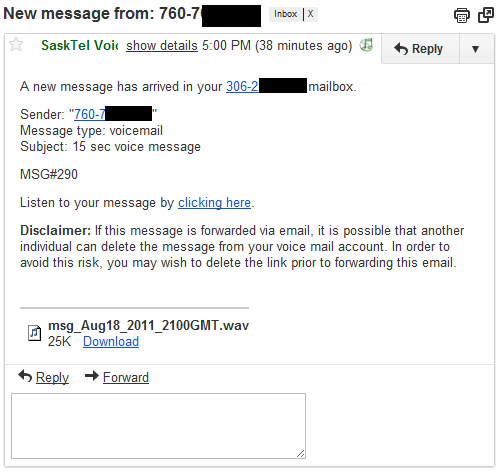
When you get a voicemail, you get an email that looks like this:

Look at that attachment size - 25KB for a quick 15 second voicemail! If your phone supports the audio file (apparently my Android phone doesn't without a .wav player app), it would probably be faster to listen to the .wav file from your email on your phone than it would be to log into your voicemail on your phone by following all of the prompts.

Finally if you decide to click the link in the SaskTel email, this is what you get:
An option to download it to a PC, listen online, or delete the message.

Cool! I don't think I will ever check a voicemail through my phone again - not only are the voice-prompt menus too slow, but basic functions like replaying or skipping messages are complete guesswork. Not any more!

Monday, August 15, 2011

Products that are Awesome: NoLED for Android

I've had an Android phone for the past 9 months or so and I've really grown to love it. There are times, though, that I miss certain features that my old BlackBerry did so well. Take BBM, for instance. It's still the best instant messenger out there, despite competition from iMessage and Google Talk, not to mention cross-platform offerings like WhatsApp (which is awesome!) and Kik.

Another feature that some Android phones lack is a notification LED. The little LED on the BlackBerry was a great, quick visual indicator of unread messages or emails. You could customize its behaviour with an app - blinking blue for Robyn, solid green for Matt, etc. I really missed that feature when I bought my Android phone, the Samsung Galaxy S Vibrant. Instead of looking to an LED for notfications, I have to press a button and wake up the display.

I recently found a very niche app called NoLED that fixes this problem with a clever solution. As it turns out, the display on the Galaxy S Vibrant is of the Super AMOLED type, which is an advanced enough display that no electricity/battery is consumed to display the colour black, since the technology doesn't use a backlight.

When you receive a notification with NoLED and your display is off and/or locked, a tiny pixel of colour will appear in lieu of an LED lighting up. The colour corresponds to an app, and is user-customizable. So maybe red means Gmail, orange means SMS, and blue means missed call/voicemail.

If you don't understand this idea yet, watch the first 15 seconds of this video.

To avoid "burning in" an image into the display, the pixels dance around the display, changing position every second or two. I find this feature useful for another reason - it's easy to spot the movement out of the corner of your eye.

The pixel size is customizable, and you can even choose to use app icons for notifications. For a WhatsApp message you see the little green icon dancing around, and for Gmail you see the classic envelope icon. NoLED makes this feature even better by allowing you to use contact/profile pictures for SMS and Voice call notifications! So if I get an SMS from Robyn, her contact picture jumps around the display.

The menus are packed with features and settings which can be overwhelming. The advantage is that you can get your phone displaying notifications exactly how you want them to behave - everyone has different preferences.

I have been using this app for a few months and have not noticed any excess battery drain due to NoLED running. The app can use the phone's proximity sensor to know when it's in your pocket or face-down, and will turn off the display completely to save that tiny extra bit of juice.

One last thing - if I haven't sold you yet, it's a FREE app. It's under active development and it's updated regularly - not too much, not too little. The developer is also receptive to feedback - I emailed in a feature request and received a reply the same day (my idea couldn't work!). If you love the app, you can donate with in-app purchasing. I sent $5 to the developer - it's one of the most clever Android apps in the market and one of my favourites, and I felt it was well worth it.

Download here.

Sunday, August 14, 2011

Install Android 2.3.3 with root on Bell/SaskTel Galaxy S Vibrant GT-I9000M

I just spent a few hours trolling through a ton of information to upgrade to and root Android 2.3.3 on Bell/SaskTel Galaxy S Vibrant (GT-I9000M). Here's the rough order I did things. Hopefully this helps another user out there.

  1. If currently rooted and NOT running Android 2.3.3, un-root. 
  2. Connect phone to Samsung Kies and acquire latest update for phone. Wait, reboot, etc. You should now be running "stock" Android 2.3.3 with baseband version I9000UGKG3. You aren't rooted. If you don't have the 2.3.3 upgrade waiting for you, you need to spoof your phone's country ID - search for "Kies registry patcher" to fix this. 
  3. Go read this guy's post on xda-developers. Download the two files - the rooted KG3 kernel and Odin 1.82. 
  4. Turn off your phone. When it's off, press the up/down volume buttons at the same time (press in the middle of the button) and press the power button. If you see the little Android construction guy, you're in download/recovery mode. 
  5. Fire up Odin, follow the instructions in the xda-developers post. When you reboot, you should be running a rooted version of Android 2.3.3. 
Bonus instructions: Get latest version of Swype (if you like Swype. If not, you may want to try Swift Key). 
  1. Sign up for the Swype beta at http://beta.swype.com/
  2. Uninstall Swype completely using these instructions or use Titanium Backup to back up Swype then remove it in the "batch remove" section. 
  3. Re-download and install Swype using the instructions in the email Swype will send you. 
  4. (note: re-installing Swype will delete your custom words dictionary, it will have to re-learn all of your custom words).
As of today I'm rooted, running 2.3.3 KG3, with the latest version of Swype Beta installed. The one thing I still have to figure out is how to apply a lag fix, which might mean replacing the kernel.. but I am really not sure. 

This is not a complete set of instructions.. but hopefully it is a useful starting point for someone out there! 

Edit: Currently I can access download mode by holding down+menu+power at startup, and recovery mode by pressing up+down+power at startup.

Edit Oct 16/2011: If your phone doesn't appear to be rooted after running the above instructions, try searching in the market for the "Superuser" and "Busybox Installer" apps, run the Busybox Installer, and reboot. 

Tuesday, April 26, 2011

TV-Out on Samsung Galaxy S Vibrant (GT-i9000M)

This past weekend I was looking for something in my cable drawer and found something I wasn't looking for: a cable like this. I remembered that my phone supposedly supports TV-Out and thought I'd try it out.

I was VERY impressed with the results!
On the top row is Cubed (a music player) and the middle three are Widgetsoid menus.

I don't have exactly the right cable, so on my TV in Montreal the output is black & white. I tested it in Saskatoon on my roommate's TV and it worked in colour. Apparently it is missing on a few similar models they made in the states.

It's a neat feature - basically any time you want to show more than one person something on your phone (pictures, a YouTube video, etc), you can just plug your phone into the TV with a $1 cable.
Landscape mode fills the screen.

Thursday, March 17, 2011

Canada Research Lab Makes Android FM Radio

Here's something neat - Canada's Communications Research Centre wrote an Android app (and a software library) that wakes up the FM radio tuner in Samsung Galaxy S phones where the functionality has been disabled or not implemented in the first place.

The Samsung Galaxy S Vibrant that I bought through SaskTel does have a built-in FM tuner and an app to listen to FM radio, but that app crashes randomly every 30 minutes or so, which is annoying.

Why FM radio instead of streaming internet radio on a smartphone? FM radio is great for tuning in immediately to local programming, instead of waiting for a feed to buffer. Also, in some settings - like my cubicle at work - users can't get a solid data connection for streaming radio.

So far FM TwoO seems to be a solid application in terms of functionality. In fact, it does more than the built-in app:

It's user interface has room for improvement, but I think it's just a concept app. Hopefully someone takes the software library that the CRC wrote and makes something beautiful.

Soured through: http://www.radiosurvivor.com/2011/03/14/thank-you-canada-unused-fm-app-for-samsung-galaxy-s-now-in-play/

Saturday, December 11, 2010

How to get Froyo on your SaskTel Samsung Galaxy S Vibrant

EDIT, APRIL 2011: Hey guys, I noticed for some reason this blog post is getting lots of traffic. Just a heads-up, the info might be out of date and inaccurate by now, especially considering that Android 2.3 is starting to roll out to the Vibrant phones!

Irritating news yesterday, as Samsung Canada announced Froyo (Android 2.2) was available for the Galaxy S Vibrant on SaskTel - and SaskTel said that was false.

Well, good news, a bunch of enterprising hackers have figured out how to get Froyo on their SaskTel Vibrants anyway. Basically, we're going to flash our SaskTel Vibrants with Bell firmware. I'm collecting these links as a helpful internet denizen, but I can't take any credit for any of the process (I do want to thank Bman_1 for pointing me in the right direction).

Standard Disclaimer: While this worked for me, there's a chance it may not work for you. If messing with your phone's firmware makes you queasy, wait for the official SaskTel update. You and you alone are responsible if you brick your phone. These instructions are largely based on this forum post with a few more details added.

UPDATE DECEMBER 19/2010: I can't say whether it's because of this procedure or not, but my Vibrant bricked itself a few days after this update. I heard it turn itself off (it played that off animation) and I was unable to revive it. It died randomly while I wasn't touching it. BEWARE!!!

--== How to get Froyo on your SaskTel Samsung Galaxy S Vibrant ==--

1. Download Kies Registry Patcher from this forum post on XDA-Developers. You will need to register for the forums. Yes, a small pain, but you want the latest version of this software.

2. Download and install Samsung Kies. This is Samsung's massive, bloated updating program. If you already have it installed, make sure you have version 1.5.3.10103.102 installed.

3. If you have Kies open after installing it, close it. Launch Kies Registry Patcher.

  • Set "Enable Spoof" to true
  • Set "Spoof Product Code as" to BMC (this is Bell Mobility Canada's code). 
  • After you select BMC, "Spoof Software Revision as" should say "I9000UGJG9/I9000BMCJG9/I9000UGJG9/I9000UGJG9". Kies version should be the same as above.
  • Click "Write Registry" and click "yes" to apply the update. 
  • You're done with the Kies Registry Patcher for now, but leave it running in the background. You'll need it in a minute. 
4. Open Samsung Kies. Now, refer to Samsung's great step-by-step instructions to updating your phone to Android 2.2. 

5. When you get to Step 13 on Samsung's upgrade instructions, you'll be waiting 2-5 minutes while the firmware is downloading to your Vibrant. This is a great time to snag a copy of the ROM, so go back to Kies Registry Patcher and select Rom (top menu bar) then "Save ROM". Don't worry, the update takes a few minutes, you'll have plenty of time to make this step. 

6. After Step 14, your Vibrant will reboot itself. The first bootup to 2.2 will be the longest bootup you will ever experience, DON'T PANIC and DON'T PULL THE BATTERY. It will start up after a few minutes. 

Once your phone has booted up, you will be running in the slowest and ugliest Android environment you will ever experience. BE PATIENT. All programs and services need to re-initialize themselves in the 2.2 environment. Give your phone about 20 minutes to sort itself out, then reboot it again (shut it down by holding the power button, don't do a battery pull). 

After upgrading, my Email app (not Samsung Email) was crashing and preventing me from pulling down the top status bar. I had to remove my work Exchange account from Settings -> Accounts and Sync. After that, things were working perfectly. 

I didn't see that much of a speed increase with the upgrade (I don't have a rooted phone or OneClickLagFix) BUT the new features are really awesome. Voice Search works great, you can install Skype, and Chrome to Phone works perfectly! 

I hope this guide is useful to a few people! If you're looking for support, your best bet is visiting that XDA-Developers thread. My upgrade went perfectly so I won't be much help troubleshooting. 

Good luck! 

--== BONUS: Fix GPS Issues if you haven't already ==--

When I got my Vibrant, the GPS was lackluster. If you're running Android 2.1, visit this XDA-Developers post and follow those instructions. 

If you're running Android 2.2, the number code stops in the above link stops working. You can get to the LbsTestMode menu by downloading an app called Any Cut from the Market, long-pressing your home screen, select Shortcuts, select Any Cut, select Activity, then scroll way down and select LbsTestMode. Click the shortcut, then go back to the above-linked post and change your SUPL/CP settings.

Sunday, July 18, 2010

Will Smartphones Availability Edge Out Small Carriers?

Here's a thought: Will the rise in popularity of smartphones push smaller carriers out of the market?

This past week I posted about SaskTel's upcoming network upgrade in August. Wayne added a helpful comment; he'd tracked down the preliminary smartphone lineup, which includes two new BlackBerry devices and two unexciting Nokia phones.

Tech-savvy consumers want the latest and greatest in smartphones. The larger the carrier, the sooner you can get the latest and greatest devices. If you're with a small carrier, you get to play the waiting game. Or the jealousy game. Or both.

SaskTel has admitted they're working on getting the iPhone 4, but I'm skeptical that will happen. Rogers has the Sony Xperia X10 and will have the iPhone 4 (as will sister company Fido), Bell will have the iPhone 4 (though Bell doesn't do business in little ole' Saskatchewan), and Telus has the HTC Hero and the HTC Desire is coming soon.

As ill-reviewed as Rogers is here in Saskatchewan, they're the only national carrier with a full selection of BlackBerry, Android, and iPhone devices.

And why is Rogers ill-reviewed in Saskatchewan? Well, their coverage is one issue - SaskTel certainly has them beat. But once SaskTel's new network is operational, Rogers customers should be able to roam on that expanded network (correct me if I'm wrong)

Rogers also adjusts their prices and plans to compete regionally. Go to Rogers.com and select that you live on Ontario. Look at voice/data plans, and you can see that evening calling starts at 9PM. Terrible! But chance your locale to Saskatchewan and look at those plans, evening calling starts at 6PM, presumably to compete with SaskTel's provincial stronghold on the mobile market.

Guess what? Their rates aren't even that bad. I priced out a new Sony Xperia X10 and they've included a helpful bill calculator on checkout, it would be approximately what I'm paying for my BlackBerry on SaskTel.

Eight years ago, when all phones did the same thing, plus or minus a few bells and whistles, SaskTel was the obvious choice for cell phone service in Saskatchewan for their coverage. Now that line is blurred - other providers have equally great coverage and offer better devices for similar rates.

I'm not about to jump SaskTel's ship and go to Rogers (I have 2 years left on my current contract, and I can't bring myself to give up BlackBerry Messenger for an Android phone quite yet), but since no carrier has a significant coverage or price advantage, more and more decisions will be made based on device availability. Carriers will need to stay up-to-date with the latest and greatest devices to earn new business.