Showing posts with label data. Show all posts

Monday, June 20, 2016

MLB.com Fantasy Baseball Score Checker

I've been hacking away on a project for my fantasy baseball league. MLB.com's fantasy baseball has its daily scoreboard in flash, so it doesn't work on mobile.

Not only did I want to check my score on mobile, I thought having easily accessible scores on mobile would make things more engaging for the whole league!

I wrote a python script to scrape values from MLB servers and display them in a simple interface:

This league has classy team names. 
The basic flow of the script is:
  1. Get the fantasy league schedule JSON data from this URL:
    http://www.mlb.com/fantasylookup/json/named.fb_index_schedule.bam?league_id=1514
    Note the league_id can be found with CTRL-F if you "view source" on your league homepage.
  2. Process the fantasy league schedule and build a big Python dictionary called this_week (I should have built a class - maybe that's on the todo list). This step figures out all of the fantasy team_id's that belong to your league_id.
    Also, build each team's roster based on the fantasy team roster data. The period_id comes from the schedule data, and the player_ids come from here:
    http://www.mlb.com/fantasylookup/json/named.fb_team_lineup.bam?&team_id=9972&period_id=13
  3. Figure out which games are being currently played in real life. This can be done by counting the number of folders containing matching regex gid_[0-9]{4}_[0-9]{2}_[0-9]{2}[a-z0-9_]* from this directory:
    http://gdx.mlb.com/components/game/mlb/year_2016/month_04/day_25/ (substitute today's date)
    Specifically, we are looking for the boxscore.json files for each game:
    http://gdx.mlb.com/components/game/mlb/year_2016/month_04/day_25/gid_2016_04_25_chamlb_tormlb_1/boxscore.json
    We are going to use these to calculate the fantasy points for each player's real-life stats.
  4. Grab every boxscore.json file for today's real-life games, read the data and build a monster dictionary called super_boxscore.
  5. Loop through all of the fantasy player rosters in the this_week variable,  and look up the player_ids in the super_boxscore variable. Calculate fantasy points for each player_id.
  6. Show the results!
I wrote most of this blog post a month ago, intending to add more features and make a richer blog post. Sadly, like many of my projects it has stalled at nowhere near completion and I have not put in any time over the last 4-5 weeks! 

But if you are running an MLB.com fantasy league and you want a better mobile interface for your members, check out my project on Github: https://github.com/b-neufeld/mlb-fantasy-checker 

Friday, January 29, 2016

Weight Loss

I think I've got this weight loss thing figured out.

In Montreal in 2011, I started writing a blog post called "Losing weight with common sense", because I was going to make all of these "sensible" changes to melt off the pounds, and hold myself accountable by blogging. Thankfully, I never hit the submit button, and those sensible changes - like eating an enormous plate of salmon and broccoli with a side of four beers and a half bag of chips for an evening snack - never paid off.

I've been overweight since my early teens. By World Health Organization standards, that means having a BMI of >25. In at least part of my high school years I was obese (>30 BMI - at 6'5" that's >114.7 kg or >253 lbs). I wasn't interested in sports, and I sure wasn't interested in moderation. I didn't particularly care, and I didn't have the understanding/knowledge to do anything differently.

In October 2014 I got a Fitbit One to use as a silent wake-up alarm, because Robyn couldn't stand my old alarm clock. Putting a step tracker in my pocket piqued some interest in weight management and I started occasionally tracking my weight for the heck of it. I clocked in at 113.4 kg; just a hair under "obese" on the BMI scale.

In November of that year, Robyn's dad passed away suddenly and unexpectedly. He was in his 50's, healthy and active. This was shocking. I started thinking - a lot - about the limited time we have on Planet Earth. I was 28; about half Paul's age.

By Spring of 2015 I had been fiddling with the Fitbit app, and mustering up inspiration to get serious about changing my habits, health and appearance. I had been reading posts in reddit's r/Fitness, r/loseit and r/fatlogic. r/fatlogic was actually the best inspiration - the subreddit showcases examples of anything that "deviates from the scientific facts of body weight management". It was a wake-up call to recognize some of those behaviours in myself (those small internal justifications I made before smashing a whole bag of Ruffles All-Dressed potato chips).

I learned that diet is the key to weight management, not exercise (although I do not dispute the value of exercise!). I learned about calories, got a food scale, and started counting.

I couldn't believe how effective it was. I plugged in a weight loss target into the MyFitnessPal app (0.5 kg/week) and it gave me a calorie allowance. By maintaining the discipline to weigh and count everything that went into my body (and estimating generously when nutritional info was unavailable), the weight disappeared at a perfectly consistent rate:

Weight loss target was 0.5 kg/week from April to December. Slowed down to 0.25 kg/week in December. Almost at my "maintenance weight" target of 85kg. 

RESULTS

Starting weight: 113.4 kg (250 lbs) - October 2014
Starting BMI: 29.6
Starting waist: 38-40"

Current weight: 85.7 kg (189 lbs) - Today
Current BMI: 22.4
Current waist: 34"

A couple tricks I used to stay motivated:

  • Daily weigh-ins, but ignore daily fluctuations. This built a rich data set and let me see that the day-to-day doesn't matter so much as the week-to-week and month-to-month. It's about lifestyle changes, not daily changes. 
  • Didn't give up up my love for snacks, just found different snacks. Tomato basil rice cakes smothered in hot sauce and beef jerky, mmm. 
  • Log absolutely everything. Estimate high if unsure. 
  • Try my best to avoid going over daily calorie limits. If I go over, it's not the end of the world. Just hit my limit the next day. 
  • Ditched the calorie counting features in Fitbit for MyFitnessPal - a much better app and food database. 
  • The key has really been education and understanding. I failed in 2011 because I thought motivation was enough to succeed. Success, at least for me, is dependent on knowledge, goal-setting, and data. 
  • Because I have the knowledge, I feel I can maintain these habits indefinitely. It's not a quick fix, it's a lifestyle change. 
Next steps - turn 30 in April with a healthy BMI for the first time in over half of my life, maintain current weight around the 85kg mark, turn remaining fat stores into muscle starting this spring when I can get out and start running again. That's a blog post for another day! 

Feels good, man. 

Thursday, November 17, 2011

New SSD for Laptop

I installed an SSD (solid state drive) in my laptop on Tuesday night. An SSD is exactly like a hard drive except that instead of a spinning magnetic disc holding all of your data, it's stored on flash memory - like iPods and cell phones use.

The blue drive is the new one. 

In modern computers one of the main speed bottlenecks is hard drives - physically spinning a disc to find some information will always take longer than transmitting some electrons through wires. By upgrading to an SSD, my  laptop boots to Windows in 40 seconds - and by that I mean after 40 seconds, there is no lag whatsoever, nothing is still loading. Previously it took about 3 minutes (2:57 to be precise) to start up to a usable state (for the geeks, I'm running Windows 7 on a one-year-old ThinkPad L412: Intel Core i3 M330 dual core @ 2.13 GHz, 4GB RAM). 

Another advantage to SSDs is that data can't be damage by bumps and jolts, whereas if you drop a laptop with a spinning hard drive you could easily wreck the drive. The main downside to SSDs is that they're still expensive per gigabyte - mine was $289 for 120GB. 

If you're thinking about upgrading, I recommend this kit from NewEgg Canada, as long as 120GB is enough for you. The kit comes with all of the cables you need to copy your existing hard drive to your new one (when you're done, everything will be EXACTLY the same, except faster). And it comes with an enclosure so that you can connect your old drive as a USB storage drive when you're done.

The whole process took just over an hour - 5 minutes to skim instructions, 10 minutes to pull out the old drive, install the new one, and connect the old one with USB, 50 minutes of data copying (I read a book), then it was done! I booted up and everything was just how I left it. 

Thursday, October 6, 2011

New House, New Server


I've decided that once Robyn and I buy a house - sometime next spring - I will need to dedicate a closet somewhere to housing a (more) powerful media server. I am getting too nerd-excited about this already.

I've got my eye on this rack-mountable enclosure that can hold 11 hard drives:

And some type of real - but tiny - server rack from these guys like this:

In terms of components, I'm thinking about something along these lines:

  • Windows Home Server 2011 (I have Version 1 on my current server and love it. So easy to use, super easy backups, and easy music/video streaming to Xbox 360)
  • 750 Watt PSU
  • 2x 2TB Hard Drives (just for starters - then I'll move over the 5TB of capacity I have in my existing server, READY2SERVE).
  • 4GB RAM (but RAM is so friggin' cheap - I've seen $30 for each 4GB, so 8GB would be $60)
  • Some dual or quad-core CPU (not too fancy - this server will mostly serve media, run backups and download things)

I think I can do everything but the server rack for under $700. In my opinion - totally worth it!

Also on my wish-list for the magical server closet (extra costs):

  • Have a 120V AC outlet installed inside this not-yet-existent closet;
  • Slatted closet doors for easy ventilation;
  • Have the internet wired directly into the closet, where a router will feed a gigabit switch. The switch can feed hard-wired ethernet ports beside the entertainment centre (Xbox 360) and an office/den, if we have one. I also want to hide a wireless router somewhere in the house (maybe on the ceiling) for maximum wifi coverage. 

And most importantly: does anyone have any good ideas for a server name? And is it crazy that I put a lot of thought into naming computers? My current server is READY2SERVE, my laptops BRAHMTOP (died last summer) and DETHPAD (current, named for Dethklok), and my desktops have been PERCEPTION, DECEPTION, INDUCTION, and PERSUASION. I feel like it's bad form to use a name twice.

Thursday, August 18, 2011

Technology-Enhanced Summer Reading

This summer I have pushed myself to read more books. I became fascinated with Amazon's Kindle a few months back and convinced myself that owning a Kindle would make me a better and more regular reader.

Instead of impulse-purchasing a Kindle, I borrowed three books from Robyn and told myself I could buy a Kindle if I could finish all three books (they were A Prayer for Owen Meany, The Road, and The Lovely Bones - all great reads!).

While I was reading those books I discovered GoodReads, a social networking site for readers. I signed up for it immediately because the idea of tracking my reading satisfies my nerdy quest to log certain activities in the way that last.fm logs the music I listen to.

On Goodreads, you can track the date you start and finish each book, and write reviews and assign 5-star ratings to each title. Each author and book has its own GoodReads page (similar to last.fm's artist, song, and album pages) which are good places to discover previously-unheard of material from familar authors. Although I am not a daily user (I wish I could read so much!), if you've got a membership, add me as a friend.

After reading Robyn's books I placed the order for the Kindle. In a word, this device is impressive. The text on the screen looks just like printed words on paper - there is no glow of an LCD screen or pixelation if you look closely. The device is thin and lightweight and it took less than one chapter of one book to feel one hundred percent comfortable using it.
It's about as thin as a pack of gum.

My pal Derek has a great post on tweaking your Kindle to get it working just the way you want it. I have to say though, you don't really need to tinker with it; it works great right out of the box.

Close-up of the display. 

I saw an interview with Amazon CEO Jeff Bezos on Charlie Rose a while back and Charie asked about competition from other "tablet" makers like Apple and Google (iPad and Android tablets). Bezos immediately responded that they are not competing with iPads - for two reasons. For one, the Kindle is a purpose-built device for people who love reading. It happens to do a few other things, but it's a reading machine. The other reason is that Kindle is not just Amazon's physical reading device, it's a digital store that distributes books through a program/app that can be installed on just about any computer, iPad/iPod/iPhone, tablet, Android, BlackBerry, you name it.

Anyway, I am tagging this post "products that are awesome" because both GoodReads and the Amazon Kindle are really fantastic and have both encouraged me to read more! I think everyone who I've talked to who owns a Kindle is happy with it.

Monday, August 8, 2011

Awesome Products: Google Picasa


I purchased my first digital camera in 2002. It was a cheap EZ-Pics (or similar) sketchy brand that lied about its megapixels - it was 3.0 MP "with software extrapolation", which meant that it was a 1.5MP camera that used software to double the number of raw pixels in the photos, and coloured those pixels with the "average" colour of the two adjacent pixels. Suffice to say the pictures were terrible.

I'm just about the farthest thing from a professional photographer, but my photos are still very important to me! My first crappy camera took lots of pictures of our dog Yogi as a tiny puppy:

Most of my photos live on my home server (see first two images here), a computer that does nothing but sit there and hold files. However, I'm very conscious of the disaster scenario of my apartment building falling down (I do live in Montreal, Quebec, and infrastructure seems to be failing lately!). If my server were to die, I'd lose 10 years of digital memories.

Rather than print all of my photos out to albums, I've chosen to use Google's Picasa software as a backup solution.

I pay a flat fee of $5 per year for 20GB of online photo storage with Google Picasa Web Albums, which is enough for 5,000 high-quality photos, or many times more lower-quality photos. Every time I load photos onto my computer, I've set up Picasa (the desktop software) to save a copy on my laptop and immediately upload a copy to Picasa Web Albums.

Actually, lower-quality photos no longer count towards the storage limit on Picasa anymore (thanks to Google Plus!) . All photos under 2048x2048 pixels - a respectable resolution, for sure - are stored for free! It's possible to configure Picasa's desktop software to automatically re-size all of your photos to under these dimensions and upload them for free, so that you always have a safe backup copy of your digital images.


It's important to note that the online backup doesn't happen automatically, you need to be logged into Picasa (the desktop software) with a Google account and explicitly tell it to save images to Picasa Web Albums. You need a Google/Gmail account to do this, but it's not difficult.

It is also important to keep an eye on permissions when uploading to Picasa Web Albums. By default, my albums are private and un-searchable, but you can also set albums to be public, shared with specific users (requires Google login), or only accessible with a link (good for emailing).

A year and a half ago, before the unlimited upload of lower-quality photos, this service was still a bargain at $5/year. I found it was the best backup solution out of Picasa, Flickr, Dropbox, and a few other web archive solutions at the time, and I'm interested to hear if anyone's got a better solution.

If you use other Google products, you will want to check out Picasa. If you buy extra storage space, it counts for your whole Google account, so I really have 20-some GB of storage for pictures in Picasa, emails in Gmail and documents in Google Docs. Picasa Web Albums has been nicely integrated in Google+ and makes sharing with Circles very easy, and it's also easy to share private albums by email with friends and family.

If you've got a free afternoon this summer, back up your photos! My sister lost all of her photos when her laptop died suddenly - it could happen any time. Hell, if you're too cheap to afford $5 per year, at least burn a DVD (under $1) and keep it at someone else's house!

Wednesday, March 23, 2011

Electoral Maps & Other Fun Data

I love data (see: here) and when the government starts churning out really cool datasets I think that is even cooler.

Yesterday Jim Flaherty released the Canadian budget in the House of Commons and the opposition parties rejected it. The Liberals will be tabling a non-confidence motion on Friday and basically what this means is that we're probably having an election in May. This may be underwhelming for most people but it's exciting for people who love The Current on CBC Radio (like me).

Inspired by all of this election talk, I poked around and found some interesting government and non-government pages:

1. OpenParliament (http://openparliament.ca/)

OpenParliament is the product of one guy being frustrated at the fact that the Government of Canada doesn't publish House of Commons data in a format easily readable by humans. So this one guy programmed a site that parses all of that raw data and makes it easily searchable and indexable. Kudos to that guy! They have statistics and history for every bill, motion, MP, etc:

Brad's favourite word is "legislation" - boring! It should be "zounds!" or "ass-hattedly"

A great site that is worth exploring! I have subscribed to RSS feeds of my MP's recent activities so I can send him angry emails when he does something dumb, like vote against a bill that would prevent children in developing countries from dying.

I think people could learn a lot about their MPs simply by looking them up on OpenParliament, and checking to see if their MP's votes line up with their personal beliefs. I know I did.

2. Elections Canada (http://www.elections.ca)

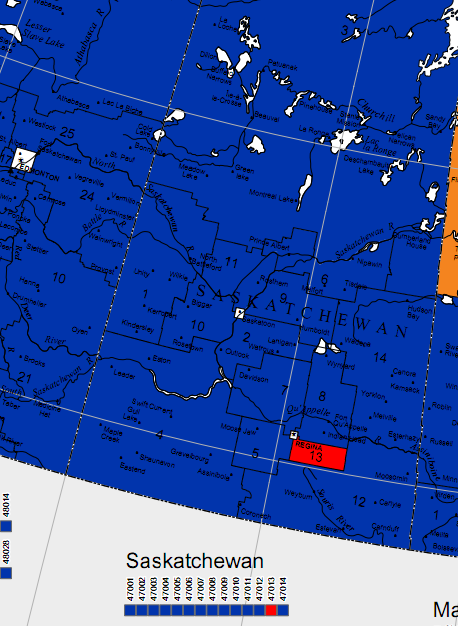
I also like love MAPS and the folks at Elections Canada have some pretty maps of electoral districts on their website (click "Maps Corner"). Most are available in PDF format so you can zoom in and check out what's relevant to you. Here's conservative Saskatchewan in blue:

That one district in Regina just can't get enough of Liberal MP Ralph Goodale.

3. Data.gc.ca (http://www.data.gc.ca/)

No pretty pictures here. The Government of Canada is slowly warming up to the idea of sharing data so that people can play with it (for instance, writing useful apps), and Canada's effort feels quite new.

Many municipal and federal governments already do this, like New York City, San Francisco, Vancouver, the United States, the United Kingdom, etc. Unfortunately Canada's page is boring and ugly - like every other Government of Canada page - and it really sucks the inspiration out of developers looking to make cool data-based apps.

Here's a lot more useful open data resources: http://datalibre.ca/links-resources/

--

I just created a "politics" tag for this blog, I hope that's not a bad move. With a looming election I think I am interested in exploring some issues based on my interests - communication, technology, privacy, etc. We'll see what happens!

Wednesday, September 1, 2010

Fuel Economy and the Weather

In January of 2008 I got my first-ever car and I was curious about the mileage - so I built this.

Here's my fuel economy by month (click for more):


Here's the weather, by month (click for more): 


Hooray for data! Who knew a 40-degree temperature difference would make car mileage almost twice as bad.

Saturday, August 21, 2010

Music as Data

This is the first post in a series about how data helps me make decisions, maintain ongoing histories, and discover new things.

Music plays a huge role in our lives as an uplifter, a comforter, a creative outlet, and an escape. I can think of few things more perfect to collect information on and analyze.

I listen to most of my music on my computer or my iPod. Since June of 2006, I have been saving statistics on nearly every music file I've listened to with a program/website called last.fm. Last.fm saves the artist, song, album, date and time the song was listened to, and generates a dynamic music history for each user.


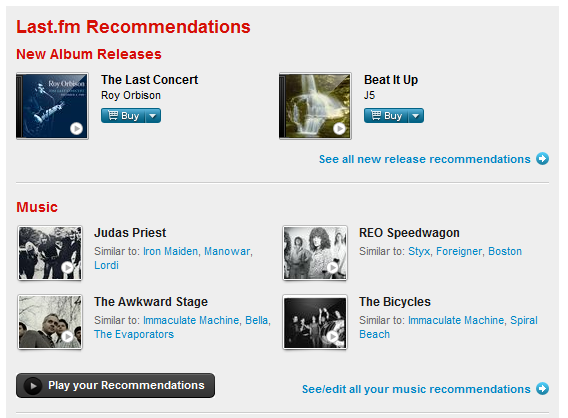
Last.fm has a built-in recommendations system. It compares your listening habits with those of millions of other users to generate recommendations for new artists to listen to or upcoming concerts to attend. The more music you "scrobble" to last.fm, the better your recommendations become, and the more music you discover.


Last.fm has an open API (application programming interface), which means that developers and programmers can create websites and programs that can access your last.fm data and give you more insight into your listening habits. One graph-generator I found (sorry, lost the link!) plots fascinating historical charts which allow you to visualize your listening habits over time. It's interesting to see your subconscious listening habits pop out - listening to certain artists exclusively during final exams, or the summer, or on weekends.


One of my favourite recent websites to compliment last.fm is called BandsInTown. You can sign up in two clicks with an existing Twitter account then import your last.fm or Pandora history. Finally, you give BandsInTown your location (ie, city or province) and it compiles a cloud of concerts in your area based on your last.fm musical preferences.


Don't want to constantly check BandsInTown or last.fm for upcoming concerts? No problem. BandsInTown allows you to import your concert recommendations to Google Calendar (and you can get the time zones right by using this little script that I wrote).

Now I listen to songs, have them scrobbled to last.fm, which is monitored by BandsInTown for concerts in my area, which automatically show up on my Google Calendar. 


This proves to be amazing every time I check my calendar and discover a new concert that I'd love to see. In my opinion, a setup like this is essential for music lovers. Given that technology exists to automate this process, if you don't do this you are wasting data.

Data waste - there's a concept I want to return to!